Google Analytics

Wednesday, November 15, 2006

Blogcast Bloomsburg: The Phoenix Group


Cliff showed some examples of the work his company does to help clients meet their performance needs.

Cliff gave examples of how his company designed a postcard telling the learners about a learning event that was going to happen, then they sent out an email and then they sent out a "movie trailer" to link the learner into the educational site. The movie trailer provided mystery and intrigue that attracted learners. The learning center has "Easter eggs" all over the place to keep the learners interested in the learning that is happening.

He also showed a project targeted toward professional photographers they did for Canon. The product allows the learner to drag and drop items to create what appears to be a hi-resolution photograph allowing the photographer to view different types of papers and make a decision about which paper makes the most sense.
__

CAC Digest

Recommended Games and Gadgets
Recommended Books
Content Guide

Blogcast Bloomsburg: E-Learning in the Real World


David Cerreta and Chris Deluca from LeanForward presented their thoughts and experiences with the needs of clients and client expectations. They discussed the needs of younger learners (18-23) in terms of how they expect to learn online.

They highlighted a number of projects they have created. They talked how a client hired technology only company who didn't get the instructional design aspects of e-learning, then the client hired an instructional design only company that didn't understand technology and finally hired a research based company that had the content but neither the technological acumen or the instructional design acumen. finally LeanForward was hired to address the client's need which they did.

__

CAC Digest

Recommended Games and Gadgets
Recommended Books
Content Guide

Blogcast Bloomsburg University: Video in e-Learning


Rachel Vazquez and Pete Mitchell (alum) presented on how they used video in e-learning and how they had to convert video to an e-learning format. They also discussed how they are delivering training via video iPods.

Captured content via Centra, sent playback to vendor to transcribe and converted it into a minute script in aCNN-type presentation for delivery via an iPod.


They are contemplating the development of the a monthly vodcast to send to all of the employees. People initially thought the video iPods are cool but really didn't know what to do with the iPods, they are still working on getting more buy in.
__
CAC Digest

Recommended Games and Gadgets
Recommended Books
Content Guide

Blogcast from Bloomsburg: Leveraging Optimal Software Training


Alum Scott Fisher and Shawn Rosler talked about how they are using Captivate to create user training on a software system used for electronic medical records. The training they create are e-learning modules that emulate the software system but they use those modules in class to make the training easier and more effective for the learners sitting in class.

Scott and Shawn develop the training used to teach doctors and others how to navigate the medical record system. So the doctors can spend less time with the software system and more time with patients.

The use of Captivate has saved time in stand up software training classes. When the software e-learning modules are done in class, it reduces training time from 3 hours to 45 minutes. Learners don't get lost on a different screen, don't hit the wrong buttons and don't end up on a screen that no one knows how to return back from.

Also Geisinger has saved milage payments to attendess and they have reduced the administration efforts substantially.

__

CAC Digest

Recommended Games and Gadgets
Recommended Books
Content Guide

Blogcast from Bloomsburg: Innovative Technology vs. Real World Restrictions


David talked about Innovative Technology vs. Real World restrictions. Dave focuses more on the technology side of the business than the instructional design aspects.
He talked about what types of technologies people have on their computers. Most people see Flash 8 players materials and think they are awesome but in many corporate environments (especially largers ones), they have not yet deployed Flash 8. They still have Flash 7.

He cautioned that in many times you need to "calm down" the client in terms of technological wishes because they want more than their current environment may be able to handle.

He showed a project he did for Symbol technologies in which the learner meets characters and follows the character to different areas of an organizaton to hear how they use bar code equipment.

David recommends that you talk to the client to see exactly what they want instead of trying to do high-end video. Stop looking at the technology and start thinking about what the client wants to do it.

David recommends Flashkit.com and actionscript.org as good resources.

__

CAC Digest

Recommended Games and Gadgets
Recommended Books
Content Guide

Blogcast from Bloomsburg: Blended Bliss


Next, Kate Wartchow from Performance Development Group presented Five Steps to Blended Bliss.

She started with a discussion of what are the challenges designers faced when working with blended e-learning. Audienc members mentioned that learning is sometimes though of as either a "workshop" or e-learning module. Clients don't understand that learning is a process that occurs over time. Not a one time event.

Sometimes clients don't really pay attention to their learning programs, they hire vendors to "take care" of training. Others mentioned that trainers need training in technology skills because they don't understand how the tools can contribute to the overall learning process.

Sometimes people view e-learning as one thing and classroom instruction as something else.

Kate explained how Performance Development Group applies a model for determing the the most feasible blend of stand up and online instruction. The model is used to set the expectations of the client in terms of what needs to be trained and in what media should it be delivered. She handed out a document to guide the CAC attendees through the blended decision process.

_

CAC Digest

Recommended Games and Gadgets
Recommended Books
Content Guide

Tuesday, November 14, 2006

Blogcast from Bloomsburg: Corporate Advisory Council


During the next three days, we are having our Corporate Advisory Council (CAC) meeting at Bloomsburg University. It is a unique opportunity for corporate professionals in the learning and e-learning field to mix and mingle with pre-professionals in the field, Master's students who are studying to become instructional designers.

We are going to blogcast this event, during each of the presentations, we are going to take some digital pictures, post some comments and seek comments from CAC attendees. Hope you enjoy the blogcast.


CAC is always a good time for alumni and others to get together.


John Stone and Angela Nichols from MountainTop technologies talk about a virtual medical training simulation they did for Regional Anesthesia.

They have included a virtual nerve simulator game. The students needed to play with the nervous system to learn where movements are being triggered. The client "loved" the activity. They then wanted to create an entire program based on the game that they developed.

They used the 4C ID model to use to develop their simulation. The model talks about recurrent and nonrecurrent tasks. Some tasks that occur the same way every time and some that are different every time. The model helped them to create the web-based simulation they were developing.

So they developed a prototype of the learning simulation with a game like interface so they worked hard to avoid a "page turner" lesson. They created a 2D needle that actually looks 3D as the needle is drawn.
__

CAC Digest

Recommended Games and Gadgets
Recommended Books
Content Guide

Definition: ADDIE

There are many times in many industries when acronyms are used as if they were "real" words and everyone assumes everyone else knows what they mean. Soon, no one even remembers what the acronym stands for. This posting is to define the term ADDIE.

ADDIE is an acronym for the process of designing and developing instruction. Actually, the ADDIE process can be used as a process methodology for many projects but let's focus on instruction. ADDIE is typically depicted as a linear process but, it does not need to be done in a strict linear fashion.

Here is what the acronym means:

A-Analysis. You need to analyze the situation to determine the learners, the tasks to accomplish and the environment in which the activity you are teaching needs to occur.

D-Design. This is when you design the instruction to meet the learners needs. You apply instructional strategies to the situation and determine the correct sequence for the instruction.

D-Develop. This is when you actually create the instruction.

I-Implementation. This is when you introduce the learning you created into the environment in which it is going to be used. This needs to be considered because often e-learning is developed but no one in the company uses it. So, you need to have a plan to implement the learning.

E-Evaluation. This is the evaluation of the learning. Did it do what it was supposed to do? Also evaluation can, and should, occur throughout the process to ensure that you are always on the right track.

Wikipedia has an entry on the ADDIE Model.(although it needs some more detail)

Here is a link to some additional information (I did not create) about the ADDIE model.

Here is a link to a paper describing different instructional design models (all a variation of ADDIE.)

Sometimes it is called the MADDIE model when the concept of M-Management is introduced. Certainly the process of designing and developing instruction requires careful management.
__

Recommended Games and Gadgets
Recommended Books
Content Guide

Analysis: You Need a Needs Analysis

We had a beautiful audio track for the online module but only a handful of the learners in the field had speakers…so, basically no one could hear the audio. --Training Director of Large Fortune 500 Company
Unfortunately this situation, and hundreds like it occur every day because the "Analysis" step of the ADDIE model is ignored.

There are many reasons to conduct a Training Needs Analysis, some are obvious, like when a new software program is being introduced into an organization. Some are not so obvious like when customer orders are declining. Sometimes a needs assessment will tell you that, indeed, a learning intervention such as a training class or the development of an e-learning module is needed

Other times, the solution will not involve learning at all. Perhaps a process is flawed and needs to be redesigned or the individuals involved within the process are given incentives that are not congruent with the goals of the organization or the environment in which the work occurs is not favorable to the desired results (too much noise or not enough light. Or, more likely too fast-paced)

The value of conducting a needs analysis is that it helps ensure that any instructional solution that is proposed will be designed and developed to meet specific knowledge and skill needs of the organization.

The time taken to conduct the needs analysis is returned to the organization over and over again in terms of faster development and less “false starts.” If you do not conduct a needs assessment, you may run into one of several problems:
  • Designing instruction that doesn’t match the learners’ needs
  • Designing training for something that is not really needed.
  • Reconfiguring poor materials for a new media
  • Designing training when the problem is based on bad incentives or poorly designed forms or some other non-training issues.
  • Developing materials that do not fit within the current learning environment
  • Designing instruction that doesn’t fit the current technology (see block quote above.)
So, make the time to do an analysis, even a one hour focus group is better than no assessment at all. I find that if you ask learners why a certain behavior is or isn’t happening, they tend to know the answer and are often more accurate and insightful than management who, sometimes, only thinks they know the answer.

Use interviews, reports, questionnaires and surveys, assessments, and observations to get to the heart of the matter. Don’t take it on “faith” alone that training is the answer, do some investigating.
__

Recommended Games and Gadgets
Recommended Books
Content Guide

Monday, November 13, 2006

Industry News: Get a "Second Life"

Want to visit the future of the web? We already saw the 3B.net example. Now is time to check out Second Life. It is a social networking site that allows you to be an avatar and roam around a virtual world created by its residents.

Here is an article from the www.money.com web site that talks about the future potential of Second Life from a web and market perspective. It is an interesting read.

Also check out Tony Karrer's post on his blog titled Second Life and Learning. He has some good links. Follow these links to get up to speed on the whole "Second Life" concept. You might think you don't need to be up-to-speed on this...but you do.

Here is my Second Life alter ego, Abbott Bundy...(although, he doesn't get out much.)


If you want to try it yourself, go to www.secondlife.com.


__

Recommended Games and Gadgets
Recommended Books
Content Guide

Sunday, November 12, 2006

Out and About: Video Conference

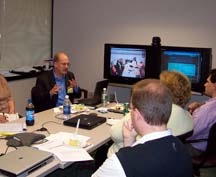
The other day, I had an opportunity to speak to some folks involved with various training functions at regional banking institution. I spoke about new learning technologies such as blogs and casual games. The meeting was with people in Rhode Island, PA and at various other locations so we used a video conference call to connect everyone. You can see the two television screens in the background of the picture. One shows the group in RI and the other shows the PowerPoints I was presenting.

While video conference calls have been around for a while, as a training tool, they seem to be under utilized. You can accomplish a great deal when you have video contact with your meeting participants.

It is a great group of people to work with and hopefully, they will be able to use many of the ideas we discussed.

__

Recommended Games and Gadgets
Recommended Books
Content Guide

Thursday, November 09, 2006

Gadgets, Games and Gizmos: Cool 3D Browser


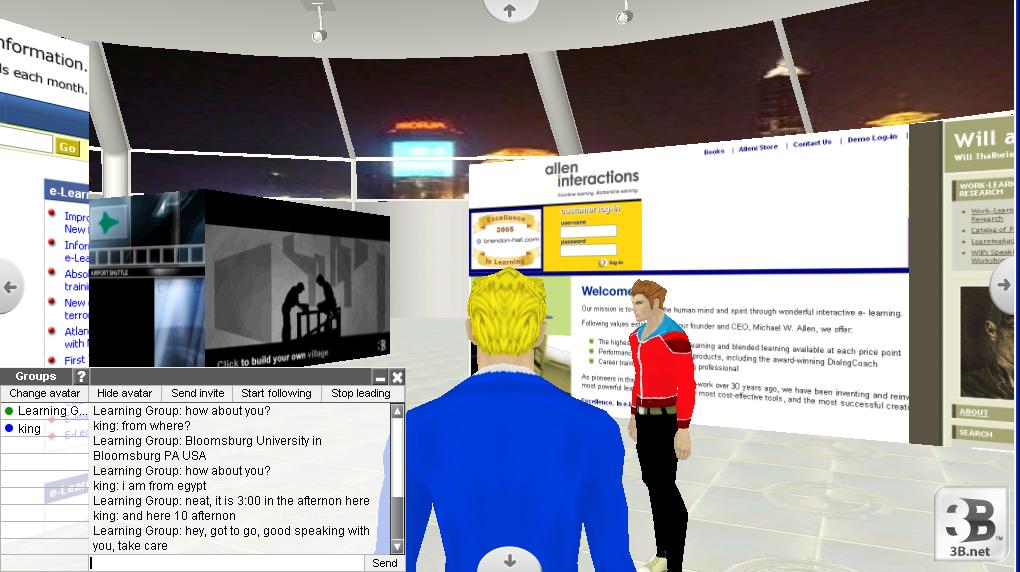
Here is a bit of interesting technology. It is a 3-Dimensional browser. You create a 3D space (called a village) and then you get a person (avatar) to walk through the space looking at "billboards" of all the web sites you have choosen. So you "walk around" looking at your chosen web sites each day instead of having to surf individually to each site and clicking. With this you get an instant visual of the site. You can also have friends join you in your virtual space and then chat with them via a text chat.

Imagine using technology like this for new employee orientation. The new employee is dropped, as an avatar that they choose, into this space and told to explore all the company web sites...for benefits, travel reports, PO requisitions, and other information all in one place all very VISUAL. Great for the visual gamers who are quickly entering the workforce. You could have some "mentors" wondering around the space answering questions, you could even have a group of new employees exploring the company web sites together.

View a demonstration I recorded using Captivate showing the interactivity. (Warning, it takes a little time to download and there is no sound except some annoying typing sounds, but it does give you a rough idea of the technology.)

Or check out the web site for www.3B.net

If you can think of other uses for this technology in terms of training, let me know via a comment on this blog.
__

Recommended Games and Gadgets
Recommended Books
Content Guide

Industry News: Online Students Increasing in Numbers

CNN.com has an interesting article titled Report: Number of students taking online courses rises

The article indicates that one in six students enrolled in higher education took at least one online course this fall. In fact, 850,000 more students were enrolled in online courses this fall than last fall--an increase of 40%

Also, the same article reports, 62 percent of chief academic officers surveyed said they felt students learned as well or better from online courses as they did in face-to-face courses.

Yet, right outside of my window on the Bloomsburg campus, they are building a new building for more and larger classrooms. It seems to me that colleges and universities are out of touch with the reality of the educational shift occurring in this country. The current cost structure of the physical plant of colleges and universities is too high. Therefore, tuition is too high and many parents can't afford to send their kids to college...yet colleges keep building more physical spaces while students keep taking more and more online classes. (can you say...disconnect?)

It kinda reminds you of Ford. Who, in spite of the obvious signs of impending increases in gas prices, kept building bigger and bigger SUVs believing that consumers would buy them forever.

Many industries like manufacturing, healthcare, stock trading have had to retool because of the disruptive force of technology--Academic institutions are next!

Colleges and universities are going to have to retool to deal with the impact of technology, the current situation is untenable in the long term. The same crisis that besieged manufacturing, healthcare and retail is going to take a bite out of academic institutions...sooner rather than later.

=======================================================================
Something else on the Web some people find useful are online dating websites, such as those who want to start dating after they just moved to a new area and don't want to have to go buy some personals in a newspaper. Going online and searching for things like NY personals streamlines the process a lot.
=========================================================================
__

Recommended Games and Gadgets
Recommended Books
Content Guide

Wednesday, November 08, 2006

ROI: Calculators for Determining E-Learning ROI

Here are a number of links to sites that contain calculators for determining the ROI of e-learning. Sometimes it is e-learning vs. stand up training and sometimes not. Some required an email to obtain and some do not. If you know of any others, please inform me and I will add to the list.

E-Learning Guru has some resources on the ROI Topic with some calculators as well, scroll down the page a little.

This calculator is very interactive and is not a spreadsheet. It is from KnowledgeAnywhere.

Here is one from William Horton Consulting, Inc. This page contains ROI calculators and some additonal information as well.

Here is Learnativity's Calculator section. You will find several calculators listed. Note: Not all are still active. It seems many calculators are no longer calculating ROI for e-learning.

Avatech has a Training and Support ROI calculator which is interesting.

For fun. Here is an ROI Quiz you can take to measure your understanding of determining ROI for learning interventions.

There are a couple of whitepapers describing ROI at my web site. You can check them out in my Archive section.
__

Recommended Games and Gadgets
Recommended Books
Content Guide

Design: Advantages of Games

The international software thinktank Gartner, Inc. has made the following statement about game-based learning in one of their recent reports (March 2006)

Games can reduce the time to competency and increase the depth of competency. Students can play a game repeatedly and learn from their mistakes. When designed properly, a game will enable students to experience on-the-job situations that they can deal with effectively in real situations. Studies have shown that games can make students proficient in skills four to six months earlier than students who took training classes but had no way to apply the knowledge.
While I tend to think that this quote may actually be discussing simulations of the work environment, I think the point is well taken. It is possible to shorten traditional learning curves through the use of a simulation-type game or interaction.

Just make sure that when you create the simulation-type game that you include three levels.
  • A demonstration level or tutorial to show the learner what he or she is supposed to be doing.
  • A practice level that allows the learner to rehearse what they should be doing but with guidance and assistance when needed or when a mistake is made.
  • A play or test level that allows unbridled access with no intervention except natural consequences.
For those of you not familiar with computer games or simulations, make an early new year's pledge to buy and play some games and deconstruct how they can be used for learning. A list of recommended games is contained in the footer of this post. Find a game, go to a teenager and ask him or her if you can play the game, I am sure they'd be glad to show you. Then play it yourself and see what happens.

========================================================================
While some people might feel that games for learning end in elementary school there are many advantages to educational games to be used all the way up through high school and college. Not online do people often learn through games with more interest since they're having fun, there are also educational games that anyone can use, such as to improve your golf game electronically.
===========================================================================
__

Recommended Games and Gadgets
Recommended Books
Content Guide

Tuesday, November 07, 2006

Yes, We Should Keep ADDIE, HPT and ISD Models

Here is my response to the Big Question at the Learning Circuit's Blog.

We need these models! In fact, we need these models now more than ever. The problem is that, as a profession, we are too eager to throw away the fundamental models on which our profession is based. We do this when:

  • technology out strips our ability to adapt.
  • we receive pushback from management or others.
  • the models become inconvenient.

Technology Out Strips Our Ability to Adapt

Blogs are a wonderful way to convey the “stream of conscious” thoughts of an expert in an informal format but are horrible from a learner perspective. They typically have no organization, limited navigational tools and no instructions for our informal learners. We just assume that they will “get it.” Even a basic term like "trackback," used in many blogs is not defined for a new learner.

Applying the instructional design principles of organization and information chunking would make many of our blogs easier to read and more efficient for our learners. These elements don’t have to take a lot of time (I don’t buy the best vs. quick argument..see below), establishing some templates, creating a few properly placed links and thinking about the overall organization of our blogs would solve the problem at the beginning. (See Tony Karrer’s post and subsequent comments on the subject.) Yet, we as instructional designers have generally failed to apply our models to the informal learning we keep cranking out every day, week or month.

How many of us has done any type of audience analysis of our blogs, written any type of goal or objective for our blog, designed an interface that is easy to navigate, has consciously built in any instructional strategies such as analogies, mnemonics, examples and non-examples? It is for these reasons that we need to stick to the proven models now more than ever…especially for informal learning tools like blogs, wikis, podcasts, etc.

Do we fault accountants who take weeks to do an audit, can’t that be speeded up? Can’t we speed up a surveyor? Or a road crew or a sales person. Yes, technology has helped to speed up all of these processes but the fundamentals are not thrown out. A surveyor does the same type of process. Only now he or she is aided with technology, the road crew builds the road with basically the same method, just the tools and materials are different. In the learning profession we seem to want to use technology to supplant our models.

That strategy doesn’t work, I’ve seen too many classes built without following the instructional design process and the result is almost always failed learning.

We Receive Pushback from Management or Others

This insecurity with our own models is dangerous. It shows when we talk to executives. At critical moments we fail to “stick to our guns” and because the technology allows us to “throw up” stuff on a screen and declare it “e-Learning”...we do it. We throw away good design in favor of fast design and then have the guts to declare that we get no respect from executives and that they don’t understand training. Hey, these people have taken the PowerPoint on steroids e-learning that you’ve created in one day and they know its crap…we fool no one with our shortcuts. (Except maybe short-sighted managers.)

Our customers (internal mostly) think to themselves, hey, I know PowerPoint, I could do that...what makes a designer of instruction so special? and since designers are not special, why do we need them? The answer? What makes a good designer special is the application of ISD, ADDIE and HPT. Without those models, my 9 and 12 year old sons could design the stuff that passes for e-learning and classroom instruction in many organizations.

It always amazes me when a client or a student is “forced” to follow the ADDIE model and then declare “hey, this stuff actually works.” Yes, these models work! We’ve only decided to abandon them because they are inconvenient and are perceived as slow. Would you ask a builder to skip the design step for a building? No need for the architect, just build the building. We've been building buildings for hundreds of years, its easy. We got it.

Sure, the building might last forever or, more likely, it might fall down tomorrow, you don’t know. You are working on faith. Employees might learn from your rapid PowerPoint lesson or they might not...you’ll never know. (In fact, it’s even worse for the learning profession because we don’t have time to evaluate the learning either...at least we can see when a building falls down.)

Also, the process of bulding a house is relatively linear...the process for filing a motion in court is realitively linear...I don't buy the arguement that the model is too linear...many models are linear...we don't throw them away...we apply them in a non-linear fashion when needed.

The Models Become Inconvenient

In the quality world, everyone thought ISO 9000 and the quality procedures would slow down production and cost organizations millions of extra dollars. It was inconvenient to put a quality process in place...too much work, too much effort and not enough perceived payback. Instead, the opposite occurred. Quality processes have helped increase production, decrease throughput times and created a better product. (See Toyota.)

If we instituted quality processes using the ISD, ADDIE and HPT models, we would get the same results. The process to move to ISO 9000 and other overarching quality methods was daunting but once done...far outweighed the level of effort. We need to redouble our efforts to enforce these models and not abandon them.

A Word About Time

Often one of the most compelling reasons given to abandon our models is because “we don’t have time.” Or “It takes too long to follow the model.” I think that is baloney.

First, you need to push back. Products typically aren’t designed, built and marketed in a day. Why should training for that product be designed, built and marketed in one day? Same with software systems that take years to develop and then they want training created and delivered in a week...?What are they thinking and what are we thinking when we AGREE to the unreasonable demands?

Second, if the model is established as a framework, then it becomes a natural part of the process and doesn’t require more time.

Third, you can do the model in an abbreviated format. For example, for the analysis phase of ADDIE, hold a one hour focus group. Yes, one hour for analysis. Now, will you get the best analysis in the world? No, but you will get some insightful information. Instead this step gets skipped, even just doing a one hour analysis can save learners hours of time in terms of focusing the instruction.

Often learning professionals don’t even do simple things like putting a Level One evaluation at the end of an e-learning module. We need to apply all elements of the model even if they are abbreviated.

As another example, if you take time up front to apply one or two instructional strategies to the content, overall learning time will be reduced. Instead we just put words on a screen because we don't have time to design the instruction. We need to use all the elements of the model in one fashion or another.

Fourth, where are we saving time? If we design rapid but ineffective learning (which we eagerly do) then when does the learning occur? The learner presumably needs that information and will get it somewhere? So they learn on the job...on someone else’s time. We really don’t save time when we skip our models, we just displace time. Rather than taking the time to develop efficient learning, we develop inefficient learning and let the learner find the information on his or her own. We don’t benefit the organization, we suboptimize. Yes, our times are shorter but at the expense of other groups in our organization who now are not as productive because they are learning what they should have learned from the training or learning event. Hey, if I have to learn what I was supposed to learn on my own, then why go through the formal learning process?

We have to stop SHAZAMING e-learning…we know it doesn’t work. We have to stop giving in to unreasonable demands. Lawyers don’t abandon the fundamentals of law when it takes to long to look up a precedent; they take the time because they view it as critical.

Conclusion
We need to stick to our models or loose relevance as a profession.


__

Recommended Games and Gadgets
Recommended Books
Content Guide

Monday, November 06, 2006

Design: Six Word Lesson Plan

Mark, great idea. Here is my contribution.

This plan is based loosely on the learning hierarchy put forth by Robert Gagne’s Five Learned Capabilities, with specific emphasis on Intellectual Skills, Cognitive strategy and Verbal information. (I know not everyone likes his work but hang with me.)

These six word objectives move the learner up from basic knowledge to complex knowledge and problem-solving, one step at a time. I used a sales context but, really, any context will do.

Use sales jargon in proper context. [Declarative Knowledge]

Apply sales concept to proper situation. [Conceptual Knowledge]

Apply sales rules for overcoming objections. [Rules Knowledge]

Correctly complete a CRM entry screen. [Procedural Knowledge]

Apply principles of good sales communication. [Principles Knowledge]

Solve sales problem, customer won’t buy. or Create successful new sales strategy. (now we are talking business results) [Problem-Solving]

__

Recommended Games and Gadgets
Recommended Books
Content Guide

Friday, November 03, 2006

Gadgets, Games and Gizmos: Recommendations

Whenever I give a presentation about Gadgets, Games and Gizmos, a boomer always asks me for a list of games they should play or gadgets they should buy to help understand the educational potential of video games and gadgets. They are always curious as to how to get up to speed.

To address this question, I have created a list of over 40 PC games, video games and assorted gadgets that I think represent the technology and the game play that need to be understood when developing "serious games" for use in corporate settings.

Here is the list of recommended Gadgets, Games and Gizmos.

(I used the Amazon feature so I could easily obtain an image of each item without the work of trying to go out and find a graphic of each item I wanted to recommend.)

Let me know if I missed any that you'd like to see on the list.

Content Guide

Shout Out: Waleed Jameel

Shout Out: Waleed Jameel

Every once in a while I am going to do a “Shout Out” to a person who has influenced me in one way or another. The Shout Out will be a recognition and a Thank You to that person. In fact, for my first "Shout Out" I should have recognized this person sooner especially on this blog but…

Anyway, a special thanks to Waleed Jameel who taught me about blogging. Many years—long before anyone was really blogging—Waleed was a student in the Instructional Technology program at Bloomsburg University. He came to my office one day and said, “Dr. Kapp, you should be blogging.” To that I replied, “Waleed, what is blogging?”

He carefully explained it to me and I carefully and politely listened and then said, as only a professor can say, “thank you for the information Waleed, but ALL I need in my life is one more thing I have to do every day.” I then promptly forgot about blogging. Yes, a professor of instructional technology failed—when first introduced to it—to see how powerful and effective blogging could be. Waleed knew but I did not.

Well years later, here I am blogging. I feel a little behind the curve. If I had followed Waleed’s advice, I would be a wily veteran of thousands of blog entries, instead, today I have less than one hundred. However, not a blog is written by myself that I do not think of Waleed. The student who could have taught his teacher…if only the teacher had listened.

Thanks Waleed and a big Shout Out to you!

Content Guide

Thursday, November 02, 2006

Design: The Difficult Subject Matter Expert

This post is a result of a comment left by one of my blog readers. I hope it helps

We have all encountered Subject Matter Experts who are less than helpful or less than expert. There are a couple of ways to deal with SMEs who might prove difficult.

One method I have found is to provide them with an overview of the instructional design process before you start asking them questions. Often times they will have no idea about the process and be a little uncertain as to what it is that you are trying to do. “Why are you asking me so many ‘dumb’ questions?” Or “Are you trying to take my job away?” Or “Are you trying to see where I make mistakes”

Also, do not always speak with the veteran SME--the person who has been on the job for years and years. Often, it makes more sense to speak with the newer employee—the person struggling to do the job. He or she will know what they don’t know and be keenly aware of the shortcomings of any learning event they participated.

If a one-on-one isn’t working the SME, try a focus group. Sometimes having several people discussing a process is more helpful than just trying to get one person’s view on a particular issue. Plus, getting a focus group means that for a period of time you will have the undivided attention of the people from whom you are trying to gather information. You don't always get the undivided attention of a single SME as he or she is probably struggling to get their "regular" work done.

Finally, make sure you ask Clarity Questions, Precision Questions and Depth Questions for each area of content you are trying to understand.

Clarity Questions
  • Could you elaborate further?
  • Could you give me an example?
  • Could you illustrate what you mean? (yes sometimes having them draw or sketch a process is extremely helpful)

Precision Questions
  • Could you be more specific?
  • Could you give me more details?
  • Could you be more exact?

Depth Questions
  • What factors make this a difficult task/procedure to perform?
  • What are some of the complexities of this task requiring special attention?
  • What are some difficulties an employee encounters when performing this task/process/procedure?

Content Guide

Tuesday, October 31, 2006

Gadgets, Games and Gizmos: E-Learning and Casual Games

Often I am asked about how games can be added to online learning without costing a fortune. One thing I believe is that casual games can be used to spice up boring online learning. However, it is sometimes hard to explain without some type of visual. Here is a presentation I have recorded for use in a class in which I served as a guest lecturer. The presentation provides some information on casual games and give some examples. If you have time, take a look at the presention on Casual Games. The presentation is done using Adobe's Breeze product.

Content Guide

Design: Creating a Scenario to Teach Software Procedures

When teaching a software procedure to learners, we know that you should break down the procedure into its discreet parts and then allow the learner to practice the various parts of the procedure and then put it back together again as final practice.

One method I often suggest is that, throughout the learning situation, you provide the learner with a number of different scenarios. Each scenario describing how the procedure would occur on the job. This helps for a number of reasons.

One is so that the learner understands the context in which they are required to perform the new procedure. When should this procedure be used?...for special cases, whenever a certain piece of information is received? What situation triggers the procedure? Learners need to be cued as to when they should follow a particular procedure.

Second, we know from learning research that the more methods used to encode information, the more likely the person is to recall the information when needed. A scenario provides various “paths” to the information as opposed to simply memorizing a sequence of steps. Also, the scenario should be as close to the “real life” situation as possible so the transfer of learning will be easier when the learner is required to actually perform the task on the job.

Your scenarios should progress from:
  • Simple (which means...at the most basic, just a review of the steps…this might even be so simple that it is not really realistic...too simplistic but the basics are covered.)
  • Typical (which means this the usual situation the learner will encounter on the job, this is how the procedure typically unfolds while on the job)
  • Complex (this is the exception and rarely happens, however, if a learner can address this scenario, he or she is probably aware of the nuances of the procedure and ready to perform the work)

Your instruction should at least encompass one version of each level of scenario.

Unfortunately, creating the scenarios is not always a simple task and usually you need to enlist the help of a Subject Matter Expert who typically has no idea how to create the scenario (they usually want to give way too much detail.)

To address that issue, I have created a Scenario Example that can be provided to the Subject Matter Expert to use as an example when they are asked to create the scenario for the learning. Please try out the Scenario Example/Template and see if you can’t get better results from your Subject Matter Experts. If you do give it a try, let me know how it works for you.


Content Guide

Friday, October 27, 2006

Out and About: Jimmy Wales' Keynote Address

At the 2006 Training Conference and Exposition, Jimmy Wales, the founder of Wikipedia gave an address about the future of open source content sites like Wikipedia (www.wikipedia.org). Wikipedia “is an encyclopedia written collaboratively by many of its readers. Lots of people are constantly improving Wikipedia, making thousands of changes an hour, all of which are recorded on article histories and recent changes. Inappropriate changes are usually removed quickly" by one of the thousands of daily visitors to the site.


The wikipedia update and addition process works as follow; someone will notice an inaccuracy in an entry and then make the change immediately. No need to notify an editor, wait for verification or even check sources. Because entries are tracked and changes recorded, people tend to make accurate changes and corrections. Even if an entry is not correct, because of the volume of visitors and ease in changing the information, inaccuracies are quickly addresses and remedied.

Wikipedia is basically a collective encyclopedia written by volunteers with over 3.5 million articles in 200 languages. Anyone who visits the site can become an author or an editor—changing or adding entries. Yet, there is really only a core number of about 650 volunteers who do the heavy lifting...most of the entries and much of the base information. Then a far larger group contributes small items or minor updates to the bulk information entered by the "hard core" volunteers.

Jimmy discussed the growth of Wikipedia and how he is committed to the concept of open sources and the "wisdom of the masses." He spoke of his goal to get more languages over the 100,000 article mark and his work to make other types of wiki's accessible to all the people of the world.

He also spoke of the decision of the organization to not censor its content for any country and how that decision compared to the Google decision to allow censoring.

Content Guide

Thursday, October 26, 2006

Develop: Using a Game Engine to Create a Simulation

Simulations are a great method for “learning by doing” but it can be expensive to create a fully immersive simulation from scratch. One solution is to “mod” or modify an existing game engine to create a simulation. An existing game engine already has the physics and the rules of the world built in. A designer is then left to focus on the creation of objects and items in the world and not with the thousands of lines of code that must be written to create a complex virtual world. It can cut development time dramatically as opposed to coding the simulation from scratch.

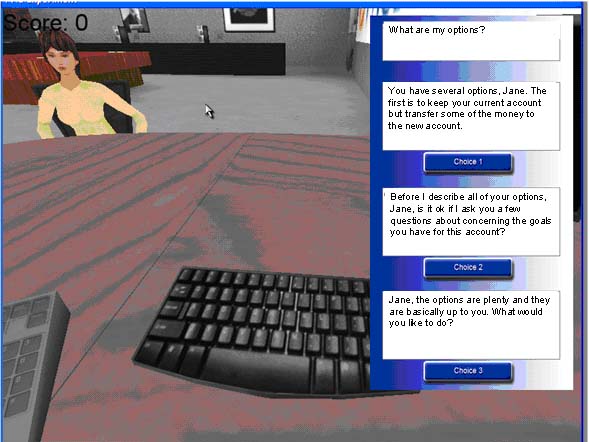
Below is a screen capture of a simulation we designed for teaching bank employees how to interact with certain customers and cross-sell services. We built this "branching story" simulation on top of the Torque game engine. The Torque tool is powerful. It has been used to create many games and is starting to be used to create some amazing simulations.

Check out the Toruqe game engine at GarageGames.com.


Confession: We hired a freshman from Carnegie Mellon University to help us with the coding for the project. He did all the programming in a little under 3 months. Thanks Mike Phillips!

Content Guide

Tuesday, October 24, 2006

Out and About: 2006 Training Solutions Conf. and Expo

Currently, I am in Denver Co. where I am speaking on the topic of Games, Gadgets and Gizmos. I had a great session yesterday with a fun group that was enthused and inquisitive. It was standing room only in the session. I really appreciated all the attendees who took their time to attend the session. THANKS:)

We discussed ways to transfer knowledge from the departing boomers to the incoming gamers within the workforce, we mentioned blogs, podcasts, casual games and other items that might help with the transfer process.

The presentation slides for Games, Gadgets and Gizmos: Transferring Knowledge from the Boomers to the Gamers are available here.

Something I did not have time to get to in the presentation but is an "added" bonus to the readers of my blog is that I have discovered a great online game...just in time for the upcoming election. You will need Flash and Shockwave but it is well worth it. This game was created by the cable industry's non-profit education foundation, Cable in the Classroom, in partnership with CNN and The History Channel. It is about running a Presidential campaign.

It is an excellent example of where online games can go in terms of animating a board game. The neat thing is that initially, you need to establish positions and key issues and then the game tracks your progress against the issues you have chosen. Well worth the download and playing time. You need to have a broadband connection but if you do, it is certainly worth it! The game was developed in 2004 but is still relevant today...good game design.

Play the Election board game.

Content Guide

Friday, October 20, 2006

Out and About: NSF ATE 2006 Conference

I haven’t blogged for a couple of days because I was at a conference sponsored by the National Science Foundation’s (NSF) Advanced Technology Education (ATE)Division and the American Association of Community Colleges. ATE promotes technology education in community colleges. It is NSF’s only program focused on community colleges. Any way, at the conference I forgot my power cord for my laptop so…I was out of luck but here is a semi-recap.

Since I serve as an external evaluator on two ATE funded grants, I attended a full day session on evaluating ATE grants. While this division of NSF wants quantitative data on the outcomes of the grants, they are also looking for qualitative data. Stories of students who are successful because of the ATE programs. There are literally hundreds of these success stories. The one story I was particularly moved by was one student who was the first in his family to go beyond high school and because of this interest and success in post-secondary education, his sister, now in middle school, is---for the first time---interested in grades and pursuing post-secondary education. She now intends to focus on school work and go on after high school to even more education. No quantitative number is going to underscore the value of the ATE program like that anecdote. Although one teacher who teaches on an Indian reservation took some classes in an ATE program, went onto the reservation and used the technology she learned to teach math to the student and quadrupled their previous standardized math score.

I think stories like these and others should remind us--teachers, trainers, professors and learning professionals--that the real focus of all we do is the learners and students. We must always keep them in mind. Education can be a life changing event and we can facilitate that process.

Here is a picture of the student panel that presented at the conference. Best panel discussion of the event (of many events I have recently attended.)


Content Guide

Tuesday, October 17, 2006

Design: Advantages of Interactivity

There are many advantages of having learners interact with the subject matter they are learning. Studies, as well as common sense, indicate that interactivity helps the learner retain information as well as increasing the learner’s willingness to spend time with the material.

In fact, Michael Moore, of the American Journal of Distance Education, wrote that interactivity between a learner and the content is “the defining characteristic of education. Without it there cannot be education, since it is the process of intellectually interacting with content that results in changes in the learner’s understanding, the learner’s perspective, or the cognitive structures of the learner’s mind .”

The conclusion reached by Fleming and Levie (1978) in their work Instructional Message Design: Principles from the Behavioral Sciences which is a listing of over 100 principles that they developed by evaluating research on the topic of designing instruction, is that “in general where the learner reacts to or interacts with the critical stimulus, learning is facilitated, and that facilitation increases with the degree of learner activity or involvement.”

The conclusion reached by Fleming and Levie is supported b William Horton, a leading expert in the field of web-based instructional design, in his work titled Designing Web-Based Training. Horton writes, “Interactivity boosts learning. People learn faster and develop more positive attitudes when learning is interactive.” The interactivity allows the learner to interact, ponder and consider what he or she is learning. Passive reading may entertain or temporarily enlighten but seldom does it remain in long term memory unless a particular emotion or environment is associated with what was read.

Additionally, Michael Allen, who co-founded Macromedia, writes that “Truly interactive learning builds an experience that facilitates both deeper understanding and easier recall.”

Interactivity in web-based training is especially important because people are not content to merely read from the computer screen as they may be with a book. Learners demand stimulation and interactivity for them to be effective as learners. The vast majority of learners need interactivity to remain focused and engaged.

References

[1] Moore, M. (2001) Three types of interaction. In The 2000/2001 ASTD Distance Learning Yearbook. (eds.) Karen Mantyla. Alexandria VA: ASTD

[2] Fleming, M. & Levie, H. (1978) Instructional message design: Principles from the behavioral sciences. Engelewood Cliffs, New Jersey: Educational Technology Publications.

[3] Horton, W. (2000) Designing web-based training. New York: John Wiley & Sons.

[4] Najjar, L. J. (1998). Principles of educational multimedia user interface design. Human Factors, 45, 343-352.

[5] Allen, M. (2003). Michael Allen’s guide to e-learning: Building interactive, fun, and effective learning programs for any company. New York: John Wiley & Sons.

========================================================================
Earning a college degree online gets easier every year as more colleges offer some online degree programs in at least a few fields. Whether you want to get an online Associates degree or you want a Bachelor's degree and you want to get credits toward a computer degree online then you should probably be able to find an online degree program for you.
==========================================================================


Content Guide

Monday, October 16, 2006

Implementation: E-Learning for the Non-Wired

While e-learning has a number of distinct advantages, one issue frequently encountered is providing course access to line workers when they don’t even have an email account. Fortunately, there are a number of methodologies that can be used to provide a solution. Here are three methods that have been used successfully by a large multi-national manufacturer of healthcare and hygiene disposables for the consumer and pharmaceutical markets who I worked with as a client.

These methods include the use of existing training classrooms, the placement of kiosks on the production floor, and the innovative creation of a Virtual Lab. Each of these methods has advantages that have helped the multi-national manufacturer maximize its e-learning efforts.

Existing Classrooms

The first method was to utilize an existing training room within some of the facilities. Since many different types of computer training occur within the different plants, several already had computers in their training rooms. In these cases, all that was need was an internet browser. The line employees would simply “travel” to the internal training room and take the e-learning instruction when needed during designated "learning times" or unexpected down time on the line.

Kiosks

Not all of the production facilities had computer-enabled training rooms, in fact, the majority did not. To accommodate the lack of computers within the training rooms some of the facilities created and/or purchased kiosks and placed them near certain functional areas. Each kiosk contained a computer with internet access and the required software for the e-learning classes.

With the kiosks in place, line employees didn’t even need to leave the floor to take an e-learning class. They simply go to the stand up kiosk or the sit down version (depending on the facility) and take the e-learning. Typically, two kiosks are placed near the functional areas to provide access to e-learning.


Virtual Lab

Not all plants had existing training rooms or space to place e-learning kiosks on the production floor. Additionally, some facilities had limited space so that creating computer-based training facilities was not an option. However, these facilities did have cafeterias, conference rooms and meeting rooms. The decision was made to purchase a wireless mobile lab with 12 laptops. This provided a tremendous amount of flexibility. The lab could be rolled into an empty conference room, it could be used in the cafeteria and the individual laptops could be taken off the cart and checked out when needed. This solution provided flexibility and mobility of the e-learning.

Additionally, the solution of the Virtual Lab was created for less than $10,000 because of the decreasing cost of laptops and wireless technology. The laptops don't need a lot of software, just a browser since the client's e-learning was housed on the vendor's server.

Managing the Process

While each of these solutions is effective, the experience of the multi-national manufacturer was that the e-learning deployment process was only as good as the management of the learning process itself.

Since line employees did not each have individual access to an email account, the e-learning system was set up to alert managers of the need for their direct reports to take an online module. The managers where then given the responsibility of making sure the line employees took the classes in a timely fashion. When managers were directly responsible for making sure the learners participated with the classes, the process was successful.

Hope this gives you some ideas for implementing e-learning within your organization, in places where the employees don't have immediate internet access for everyone.


Content Guide

Friday, October 13, 2006

Design: Time Savings Converting Stand Up Training to E-Learning

Over the years, I have collected some information on the reduction of time for converting stand up training to e-learning. Here are some statistics you might find interesting. It seems that the average reduction in time is between 40% and 50%.

With e-learning, “results comparable to those of instructor-led training have been achieved in 40 to 60 percent less time.” --Zenger, J., Uehlein, C. Why Blended Will Win, T+D (formerly Training and Development Magazine), ASTD, August 2001, pg. 57.

“Over 30 studies have found that interactive technologies reduce learning time requirements by an average of 50 percent.”--Miller, R. L, Learning Benefits of Interactive Technologies, Multimedia and Videodisc Monitor, February 1990, pg. 14.

“There is very strong evidence that computer-based training requires less time for training compared to instructor-led training. The amount of reduction ranges from 20-80 percent, with 40-60 percent being the most common.”--Hall, B., Web-Based Training Cookbook, Wiley Computer Publishing, New York, 1997, pg. 108.

“Office Depot used a virtual classroom to simultaneously training students in Florida, California, and Texas, thus increasing enrollment by a factor of three while increasing student satisfaction by 30% and knowledge retention by 25% while simultaneously decreasing costs by 80%”. --Horton, W., Designing Web-Based Training, Wiley, New York, 2000, pg. 26.

Fletcher after carefully reviewing over forty independent studies found that “Technology Based Training (TBT) yielded a time saving of 35-45% over traditional classroom instruction while obtaining equivalent or better gains in learning retention and transfer.” --Fletcher, J.D. (1990, July). Effectiveness and Cost of Interactive Videodisc Instruction in Defense Training and Education, Washington DC: Institute for Defense Analyses.

If you have any similar statistics, please post as a comment.

Content Guide

Thursday, October 12, 2006

The Learning Circuits Blog: The Big Follow-up Question

Here is an interesting discussion about how we can encourage learning professionals to blog.

The Learning Circuits Blog: The Big Follow-up Question

Learning Circuits Blog: How Do We Get Learning Professionals to Blog?

How do we get learning professionals to blog?

This is the new question at the ASTD Learning Circuits’ blog. My thoughts:

For the Pre-Learning Professional:
As a professor of instructional technology…I have a leg up. I can have a direct impact on providing soon-to-be learning professionals with an opportunity to learn how to blog. I can, and have, introduced it to my classes and encourage students to sign up for a blog and to become active. Next semester it will be a requirement, every student will blog…at least for a month.

So one thing that can be done is introduce these new Web 2.0 technologies into the academic programs for learning professionals. This is not as easy or as straightforward as it seems. I once, at a national conference, asked a well-known person who spoke about methods for effective e-learning how many e-learning courses they taught and the answer?...“None.” Here was a learning “professional” advising others about e-learning when they were not teaching e-learning themselves…disturbing.

So how many professors of instructional design, instructional technology or professional training curriculums are blogging and thus sharing that knowledge and experience with their students? I would argue—not enough. Maybe (I said maybe) every learning professional shouldn’t be blogging but every professional who is teaching learning professionals should be blogging. We need to introduce pre-professionals to the tools that help facilitate learning in their organizations.

For those already in the field:
While there are many people in the learning profession, not all are professionals in the field of learning and development. We have no central credentialing agency like doctors or lawyers or even CISCO Technicians…so anyone who is conducting training in an organization can be labeled a learning professional (possible subject for a future “Big Question”).

Many people do not have formal degrees in the field, do not have training in the field and are simply passing through the field. These individuals may not care about technologies and learning and development as much as those of us who are vested in the field. So it is unlikely that we will get everyone in the field to blog.

However, for those who do care, we (the profession) need to offer professional development opportunities at conferences (national, regional and local) just as we do for e-learning. We need to publish articles on the topic, publicize case studies and provide learning opportunities for those who want to learn about blogging and incorporate it into their organizations. Maybe have certificates…conduct workshops. Train trainers.

For the blogging community:
As someone relatively new to blogging, the blogosphere does not make it easy (although I do appreciate all of Tony Karrer’s tips and ideas about blogging.) All the terms RSS, Permalink, trackback, etc. make it difficult for a learning professional— already pressed for time—to jump into the blogging process. Most learning professionals are barely treading water. Some are just now learning about e-learning.

If we want more learning professionals to blog, we have to make it easier both technologically and conceptually. We need to put blogging into terms that learning professionals can understand. We need to make an effort to train and evangelize the Web 2.0 tools if we truly think they are important. We need to under take efforts to let others know about organizations who have successfully utilized these technologies.

Blogs in Organizations:
One interesting comment by David Wilkins concerned how useful it would be to have every learning professional in an organization blogging for personal growth. While organizations would not benefit from every learning professional blogging for personnel growth, they would (and do) benefit from having technical, engineering and sales experts blogging.

Learning professionals should blog (at least for a month) so they know how and when to enable blogging for internal experts. Learning professionals should be blog enablers…teach subject matter experts when and how to blog. As an example, several pharmaceutical companies I am working with are considering blogging for the sharing of knowledge in therapeutic areas. Those learning professionals will not themselves be blogging, but helping others who have the medical expertise to blog (after they work out tons of legal issues…if that’s possible.) And there are other examples:

In my upcoming book Gadgets, Games and Gizmos for Learning (Pfeiffer, April 2007), I chronicle several companies that are using blogs successfully, here are some exerts:

Dr. Pepper/7 UP, Verizon and Hartford Financial Services Group all have internal blogs …At some DaimlerChrysler plants, managers use blogs to discuss problems, share information and keep a record of solutions. At the Dutch technology company, Macaw, up to 90 percent of its employees blog to share knowledge about technical issues and resolutions...At IBM blogs are used to discuss software development projects and business strategies.

As for what a blog can do in terms of knowledge sharing and informal learning in an organization (another exert):

Blogs can be used to track the progress of a project, gather and post information about competitors and to share ideas among geographically dispersed individuals. Internal blogs provide a written, time-stamped version of research and development programs. Organizations can track the growth and development of ideas in a single location. It is great for recording the development of a patent or the history and progress of research projects… A blogs’ inherently open, anarchic nature may be a bit unsettling for some, but it is their simplicity (once you understand how it works) and informality that give them appeal and wide spread use. The idea of simplicity and informality is what appeals to many younger employees. They will often turn to internal blogs before looking for more “formal” channels of information.


So, to answer the question: As blogging learning professionals ourselves, we need to teach others about blogging through inclusion, language simplification, examples and success stories. We need to teach others how blogging can be used to enhance learning within an organization.

We also need to teach others when blogs should not be used. Just as the profession has learned that e-learning is not the answer to every training issue, I hope, we have also learned that neither is stand-up instruction…neither are blogs or learning chunks, or podcasts or any other technology. As professionals we need to know when to apply technology to enhance learning and when to reach out and give a physical pat on the back to enhance learning.


Content Guide

Wednesday, October 11, 2006

Gadgets, Games and Gizmos: Games as Teaching Tools

Here is a post by Mark Oehlert summarizing a discussion of games as effective teaching tools.See the summary.

Mark has a great blog, filled with great information. Additionally, he is a great guy and excellent technical reviewer. He provided awesome insight and ideas for my Gadgets, Games and Gizmos for Learning book and pointed me in the direction of some great resources. He really helped to round out the book. Thanks Mark.

I suggest you check out Mark's blog, e-Clippings (Learning as Art). You will learn about games, designing instruction and other topics relevant to the field.


Content Guide

Tuesday, October 10, 2006

Evaluation: Instructor Observation

Today, I found a question on the Bloomsburg University Institute for Interactive Technologies alumni listserv.

[ Looking for] Evaluation forms... but not from the student stand point for an instructor, but something that an instructor can give to a briefer in the class to let them know how they did and what they could work on for the next time concerning their content delivery. I...was wondering if anyone has and would be willing to share what they have done.

I have done a number of instructor observations and have a form on my web site. The Instructor Observation and Evaluation form. This form is used to evaluate an in-class performance of an instructor.

It is designed to provide an opportunity for the observed instructor and the observer to have an open discussion about the instructor's effectiveness based on sound, objective criteria for sound delivery of a training class.

If you have other criteria, please post them in the comments section of this blog, it would be great to learn of other criteria that are used for instructor observations.

Content Guide

Monday, October 09, 2006

Design: Teaching Attitude

Whether we think about it regularly or not, attitude and employee morale play a large part in the success of any organization (and any learning progarm).

High morale and enthusiastic employees are a plus in any organization. As Malcolm Gladwell points out in his work The Tipping Point..."it only takes one or two disenchanted employees to spread bad morale like a contagious disease."

So, organizations most devote some of their training and learning resources to teaching a positive attitude toward the organization or at least in trying to influence the majority of employees toward a positive outlook concerning their required tasks and duties.

While most of the time, we do not think of teaching attitudes, organizations like Habitat for Humanity and the United Way attempt to teach attitudes toward helping other people who are not as fortunate. Advertisers attempt to teach attitudes toward certain products. Public awareness groups teach attitudes toward smoking, drugs, and unsafe sex. Many of the same techniques used by these groups can be used to help influences the attitudes of trainees toward new computer implementations, a change management initiative or a restructuring of the organization.

Several methods have been found effective in teaching and influencing attitudes. These methods include:

  • Endorsement of the concept by credible role models (leaders of the company, outside consultants, respected employees within the organization.)

  • Awareness of the likelihood of success (provide examples and case studies of other companies that have succeed with a similar program.

  • Emotionally charged media events (think of the launch of new software products, much fanfare)

  • Display of confidence and enthusiasm by those in charge (have company leaders openly and honestly discuss the new program or initiative)

  • Active participation in an activity or event (sometimes having a person take part in an activity will help them see its value—even if they were initially skeptical)


Content Guide

Saturday, October 07, 2006

Gadgets, Games and Gizmos: Knowledge Transfer

Here are a few items that are discussed in my upcoming book Gadgets, Games and Gizmos for Learning: Tools for Transfering Know-How from the Boomers to the Gamers by Pfeiffer in April 2007.

Transfering know-how to the gamer (nex-ter, Gen-Y) generation.

•Focus on using games to teach basic but essential knowledge such as facts, concept and rules.

•Use simulations to teach advanced knowledge like procedures, principles and problem-solving.

•Use of handheld gadgets to provide immediate access to information or for transferring knowledge from boomers to gamers via distance in real time.

•Use corporate “cheat codes” to provide quick chunks of knowledge.

•Move information and knowledge out of rigid course structures to create small, easily searched bite-sized nuggets. Gamers are used to “Googling” information—not reading manuals.

•Replace education with automation. Automating a process is often better than trying to develop and maintain a training program. Think of cash registers that give change--no training needed on how to calculate change.

Read my whitepaper on the topic.

Content Guide

Friday, October 06, 2006

Design: Teaching Soft Skills: A Four Step Method

Often I am asked if soft skills: negotiation, leadership, etc can be taught online. To some extent the answer is “yes.” While I do not believe one can ever truly become a leader or expert negotiator just from online courses, I do believe that soft skill courses in those subject areas can reduce the overall learning curve and make people more effective when they are faced with situations in which they must use those skills in the physical environment.

So…how is this done?

One way to teach soft skills online is to use a four-step method. The first step is to present a model of the desired behavior to the learner. For example, in an opening lesson on team building the steps of forming, storming, norming, and performing are modeled through a short video clip.

A short video clip or a montage of moving images on team building showing the interaction of a successful team and how it functions effectively to solve a difficult issue is useful to set the learning expectation. Principles have a variety of intricacies that must be observed first-hand to be fully understood and appreciated.

The second step is for the learner to develop a mental checklist of the key behaviors of a particular principle. For example, in team building, the skill of active listening is important. Active listening involves paraphrasing, acknowledgement, and understanding how something was said in addition to what was said. It is best when learners are asked to deduce those behaviors from the video model presented in step one. While this poses a problem when designing online instruction, it can be over come by including a button or a link like “What the Expert Would Do” or “Ask the Expert.” Or having a “Frequently Asked Questions” button or link. Also, through clever links and questioning of the learner, you can force them to think about those things and provide answers.

The third step is to provide numerous examples of the applied principle in the form of scenarios. This involves case studies of the skills being applied in a variety of situations. It can also involve discussion of what the learner would do if confronted with a situation in which the particular principle was required (this can be done in an online classroom environment to supplement any self-paced courses or even done through a blog.)

Step Four is that the learners need to have the opportunity to practice the principle in a realistic environment that provides feedback on their actual behavior. This can be an online branching story or an interactive environment.

Please remember…teaching soft skills online is a step in the process and is not the final answer to learning how to negotiate or lead. The learner then needs to really be put into situations where they are required to lead or negotiate and given face-to-face instruction to finish the learning (if you can every full “learn” those skills.)

For more information, see a whitepaper on the subject Designing Instruction to Teach Principles(Soft Skills)

Content Guide

Thursday, October 05, 2006

Out and About: Guide-On-The-Side


On October 23-25, just a few weeks away, I will be serving at the Training Solutions 2006 Conference as what they call a "guide-on-the-side." I will be meeting with a group of colleagues who are interested in exploring the concept of buying decisions and how to effectively make those decisions. I am excited about the opportunity. We are meeting the 22nd from 4:40-6:30 and then periodically throughout the conference.

We are going to discussion issues related to:
• SELECTING the right e-learning vendor.
• CREATING effective Requests For Proposals.
• MANAGING e-learning buying decisions for the creation of the best possible product for your organization

It should be a lively discussion and filled with good information and an educational exchange of ideas and concepts. Some resources already available on the topic can be found on my web site's archive page. I teach a class concerning writing an e-learning proposal and the issues involved with purchasing and selling e-learning solutions. I am really looking forward to meeting all the people who signed up.

I will also be presenting on Monday, October 23rd on the topic of "Games, Gadgets and Gizmos: Tools for Transfering Knowledge from the Boomers to the Gamers" from 1:30 to 2:30. They also have me presenting "Creating Effective and Selective E-Learning RFPs" on Tuesday, October 24th from 8:00 am to 9:00am for the early conference risers. If you are at the conference in Denver, please stop by sometime during the conference, I'd love to meet you.

Content Guide

Wednesday, October 04, 2006

eLearning Technology: Top Ten Reasons To Blog and Top Ten Not to Blog

Here is a great summary of the blog discussion that occured over at the Learning Circuits Blog by Tony Karrer

eLearning Technology: Top Ten Reasons To Blog and Top Ten Not to Blog

The Learning Circuits Blog: The Big Question for October: Should All Learning Professionals Be Blogging?


Get involved in this lively conversation about whether or not all learning professionals should blog.

The Learning Circuits Blog: The Big Question for October: Should All Learning Professionals Be Blogging?

Yes, All Learning Professional Should Blog.--At Least for Month

Yes, yes and yes. In my years as a professor of instructional design and as a consultant in the field I have seen too many learning professionals unaware of the technologies that can make learning events effective. Even worse, I have seen too many professionals aware of the technology but unaware of how it can be properly used to facilitate learning. Poorly implemented and/or designed learning technologies are an embarrassment to the field (think shovelware e-learning courses or boring PowerPoint lectures transformed to boring online courses).

Having said that, I believe that while technology is no panacea…it is no pariah either.

When my 9 and 11 year old sons have a deeper understanding of Web 2.0 tools, than some learning professionals I’ve encountered, I wonder how these learning professionals are training the upcoming gamers and dealing with managing the ever increasing pool of knowledge within their organizations and the field.

Every learning professional should be forced to blog, podcast, contribute to a wiki, play video games and IM. These activities should be with fellow learning professionals and with the learners within their organizations. It is not difficult, costly or overly time consuming to work with these technologies.

If you desire to truly understand the capabilities, limitations and possibilities of blogs, wikis, etc…you must work with them. Roll up your sleeves and dive in.

You cannot understand the frustrations and elation of being an online learner until you participate as a learner in an online course. You will not be an effective online instructor until you are an effective online learner. You lack something by not having been a student in the online environment.

The same is true about blogging and the other tools of the web. If you have never blogged or commented on a blog, you will never truly understand the impact, power and possibilities of blogging.

Having said that…I do not think the experience has to be a life-long commitment. I would imagine that if a learning professional created and maintained a blog for a solid month…that would be enough (after being forced to post an entry every day, not getting as many comments as expected, and working through some technology issues, you’d get it.).

At the end of the month, the learning professional would understand the concept of blogging, the abilities of a blog and the parameters under which blogging should occur.

Then intelligent and informed decisions could be made about when and why to use a blog within an organization…rather than blindly ignoring or embracing the technology of blogs.

Content Guide

Gadgets, Games and Gizmos: LEGO Star Wars II


If you are not a gamer, or even if you are, you need to try out the LEGO Star Wars II Game. The game is simple but fun to play.


It is engaging but not overwhelming.

It is designed to be played by kids and adults. If you are new to video games, this is a good place to start (especially if you are a boomer who grew up with the original Star War Movies.)

I am always amazed at how much a video game is able to teach the player without the player even being aware he or she is learning.

For example, you learn that if you destroy shrubbery, you receive coins. If you see a small door, you become a small character to navigate to another location... different characters are better in different missions. When you see the image of R2D2 near a door, you need R2D2 to open the door.

What if we developed e-learning programs like video games. Think of the application to a corporate environment...every time you saw an ethics violation, you had to report it. If you lift heavy boxes, you must follow the right procedure to collect coins. You have to wash your hands for 20 seconds before handling food to move to the next level. You must choose the right product to respond to a customer need to avoid loosing the customer. The possiblities are endless...

Your assignment young Jedi is to play a video game today and think of the instructional design implications.

If you want to purchase a LEGO Star Wars II game, go to LEGO Star Wars II

Choose the game and platform right for you. Personally , I have the PSP and the PS2.

Content Guide

Tuesday, October 03, 2006

Out and About: Bloomsburg Entrepreneurs

Recently I had two meetings with two local (Bloomsburg, PA) entrepreneurs. One is working to automate information systems in sheriff's offices and one is looking to automate the medical recruitment process. Neither idea is directly related to instructional design but both include designing systems that are easier and more convenient to use.

Two things strike me as interesting about my recent discussions:

1) Both are running active technology companies in a rural area. I find this exciting and to be a growing trend. Technology really does allow you to create and be creative from anywhere. Broadband is going to allow an exodus from suburban areas to rural areas. Look for this increasing trend.

Lots of rural areas are encouraging it. In the Bloomsburg area for example, we have developed a regional technology center that is attracting established and start up high-tech companies to the region because of the proximity of our instructional technology program and other programs at the college.

You can see the tech-center for your self. Check it out. Also, the town of Bloomsburg is part of a Keystone Innovation Zone, a designated area which is designed to promote innovation and technology. You can read more about that at the associated KIZ web site.

2) Automating processes requires instructional design. Too often designers are brought in after a software product is created. How much easier would it be for people if instructional design was used in product or software design up front. Screens would be more intuitive, processes would be self-teaching. Alas, we designers might be out of a job but...it is a chance I'd like to take.

As always, comments, kudos, complaints and queries are welcome.

Content Guide

Monday, October 02, 2006

Mobilemind

Mobilemind

Here is an interesting link to a discussion about the use of animated characters in training programs.

Design: The Long Tail of Instructional Design

Chris Anderson, author of a book titled The Long Tail, noted that products that are in low demand or have low sales volume can collectively make up a market share that rivals or exceeds the relatively few current bestsellers and blockbusters. He called this The Long Tail after the statistic phenomenon.

You can get a more indepth definition at The Long Tail entry at Wikipedia. You can also check out an article on the subject titled "The Long Tail" (simple enough) at Wired Magazine or check out the Chris Anderson's blog on the subject.

You can pick up the book here if you want.


It is an interesting economic concept but, also, I believe an interesting Instructional Design concept. If the idea is that every person each day will need some some book or song--even if it is only one person, would it not make sense that in an organization, everyday some person would need every piece of information that is buried in a course, manual, policy or procedure...just not everyone and just not all at once.

Every piece of information within an organization should be considered up-for-grabs... somebody needs it at some point. This thought should cause designers of training to further their work to diaggregate content. Content needs to be more searchable and accessible than ever before.

As designers we need to figure out how to create more avenues to knowledge... more summaries, abstracts, overviews, meta-data, and quick tips and techniques than every before in more formats...text, audio and video. The days of courses with hundreds of pages of information are numbered....or should be.

Content Guide